Evaluation Framework
Overview
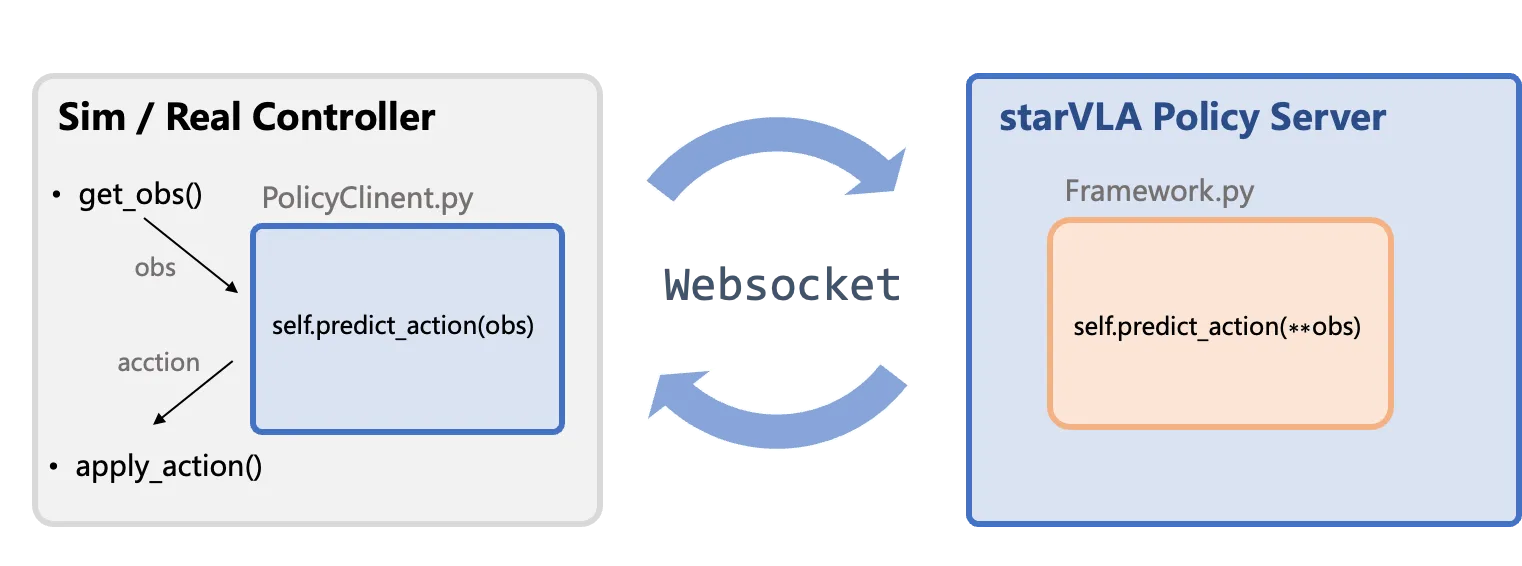
Section titled “Overview”StarVLA standardizes the inference pipeline for real-robot or simulation evaluations by tunneling data through WebSocket (a network protocol that enables bidirectional real-time communication between client and server), enabling new models to be integrated into existing evaluation environments with minimal changes.
Architecture
Section titled “Architecture”The StarVLA framework uses a client-server architecture to separate the evaluation/deployment environment (client) from the policy server (model inference).
- Policy Server: Loads the model, receives observations, and outputs normalized actions.
- Client: Interfaces with the simulator or real robot, and post-processes model outputs:
- Unnormalize: Converts the model’s [-1, 1] normalized actions back to physical quantities (e.g., joint angles).
- Delta-to-Absolute: If the model outputs incremental actions relative to the current position, adds them to the current state to get absolute target positions.
- Action Ensemble: The model may predict multiple future steps at once; overlapping predictions from consecutive calls are weighted-averaged for smoother execution.
Component Description
Section titled “Component Description”| Component | Description |
|---|---|
| Sim / Real Controller | External to StarVLA: Contains the core loop of the evaluation environment or robot controller, handling observation collection (get_obs()) and action execution (apply_action()). |
| PolicyClient.py & WebSocket & PolicyServer | Standard Communication Flow: Client-side wrapper responsible for data transmission (tunneling) and interfacing the environment with the server. |
| Framework.py | Model Infer Core: Contains the user-defined model inference function (Framework.predict_action), which is the main logic for generating actions. |
Data Protocol
Section titled “Data Protocol”Minimal pseudo-code example (evaluation-side client):
# Import path: from deployment.policy_client.policy_client import WebsocketClientPolicyimport WebsocketClientPolicy
client = WebsocketClientPolicy(    host="127.0.0.1",    port=10092)
while True:    images = capture_multiview()          # returns List[np.ndarray]    lang = get_instruction()              # may come from task scripts    example = {        "image": images,        "lang": lang,    }
    result = client.predict_action(example)  # --> forwarded to framework.predict_action    action = result["normalized_actions"][0] # take the first item in the batch    apply_action(action)
For the Model Server, simply launch it with:
#!/bin/bashexport PYTHONPATH=$(pwd):${PYTHONPATH}
# Point to your StarVLA conda Python# $(which python) automatically picks up the Python from your currently activated conda env# Make sure you've run `conda activate starVLA` before executing this scriptexport star_vla_python=$(which python)your_ckpt=results/Checkpoints/xxx.pt   # Replace with your checkpoint pathgpu_id=0port=5694
# export DEBUG=trueCUDA_VISIBLE_DEVICES=$gpu_id ${star_vla_python} deployment/model_server/server_policy.py \ --ckpt_path ${your_ckpt} \ --port ${port} \ --use_bf16- Ensure every field in
exampleis JSON-serializable or convertible (lists, floats, ints, strings); convert custom objects explicitly. - Images must be sent as
np.ndarray. PerformPIL.Image -> np.ndarraybefore transmission and convert back on the server usingto_pil_preserve(from starVLA.model.utils import to_pil_preserve) if required. - Keep auxiliary metadata (episode IDs, timestamps, etc.) in dedicated keys so the framework can forward or log them without collisions.
PolicyClient Interface Design
Section titled “PolicyClient Interface Design”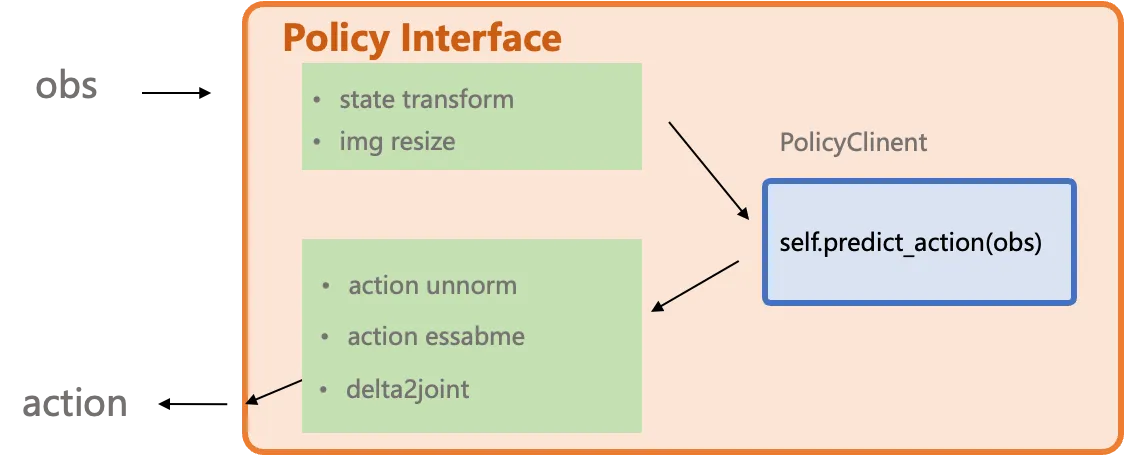
The *2model_interface.py interface is designed to wrap and abstract any variations originating from the simulation or real-world environment. It also supports user-defined controllers, such as converting delta actions to absolute joint positions. You can refer to the implementations for different benchmarks in examples to build your own deployment.
Q: Why do examples contain files such as model2{bench}_client.py?
A: They encapsulate benchmark-specific alignment, e.g., action ensembling, converting delta actions to absolute actions, or bridging simulator quirks, so the model server can stay generic.
Q: Why does the model expect PIL images while the transport uses ndarray?
A: WebSocket payloads do not serialize PIL objects directly. Convert to np.ndarray on the client side and restore to PIL inside the framework if the model requires it.
Feedback on environment-specific needs is welcome via issues.